
General Drum Scanning Information
How is my film scanned?
The PrePress Express 20 step drum scanning process: (All film is scanned either on our Howtek 7500 Pro or Aztek Premier! drum scanner)
Now with Digital Photo Lab Pro® (DPL Pro®) by Aztek!
PrePress Express specializes in drum scanning film from 35mm all the way up to Ultra Large formats (16x20 max).
File sizes from 100MB up to 30GB (48 bit)
1. After receipt of your film, a job ticket is created in our order management system with all of the job information.
2. We examine every piece of film for damage, embedded dust and scratches before we start the scanning process.
3. Each piece of film is cleaned using Anchor Film Kleen® and Scanning Wipes.
4. An overlay sheet of optically clear Mylar is then attached to the drum.
5. A thin layer of Kami SMF is sprayed between the acrylic drum and mylar.
6. The film is then inserted between the Mylar, Kami and acrylic drum.
7. We then spray the top and bottom of the film with Kami Scanner Mounting Fluid.
8. After all of the film is inserted and covered with Kami, the end of the Mylar is pulled taught and secured to the end of the drum.
9. The left and right edges of the Mylar are taped down to the drum.
10. Using a pressure roller, we squeeze out any air bubbles trapped between the Mylar, Kami, Film and the drum.
11. The end of the Mylar is sealed with tape and the surface of the Mylar is cleaned.
12. A pre scan is performed and each scan is individually corrected for color and density curve and levels.
13. We now set the size, resolution and aperture for each scan.
14. The final scan is now made. This can take anywhere from 5 minutes to 2 hours.
15. After the scanning is complete, each file is transferred from our scan server to our production server.
16. The drum is now removed from the scanner and the film is carefully removed. We then clean the film using Scanner Wipes & Film Kleen®.
17. The scans are then opened in PhotoShop®. Depending on the selected service, we remove dust, scratches and correct the overall tone & contrast.
18. The files are now burned to a CD or DVD depending on the size.
19. Optionally, The scans are uploaded to our secure download site for easy retrieval.
20. Your film and dvd is carefully packaged and sent using a common carrier with insurance and tracking.
The scanning process is now complete. Order are sent out as soon as possible after the scanning is completed.
File Specifications
File Specs
Our standard files are prepared as follows:
Your film is scanned on our Howtek 7500 Pro or Aztek Premier! drum scanner, Now with Digital Photo Lab Pro® (DPL Pro®) by Aztek!.
We mount all of our scans using Kami SMF mounting fluid. Kami is industry tested to provide the best scans possible.
Not only does Kami SMF reduce apparent grain and dye clouds but also masks most scratches in the film base.
Standard files are 8bit TIFF's uncompressed - in Adobe RGB (1998) format. 16 bit files are also available.
When we scan B&W film, they are scanned as an RGB file to preserve as much of the data as possible.
We normally scan with No USM applied. Depending on your requirements, we can apply in scanner USM.
Every scan has a custom curve, color & levels applied using a Wide Gamut profile to capture as much data as possible.
Because of this, your scans may appear flatter then you are used to. This allows you to set the tone and contrast to your own specifications.
Film Rebate (Edge)
All of our scans include the film rebate or edge of the film in the final scan.
Please take this into account if you need the image area to be a specific size.
We offer an additional 50mb to cover the film rebate at $5 per scan.
Additional Scanning Services
48 bit (16 bit per channel) NC*1
Large Film (over 8x10) 20%*2
Aperture Adjustment 25%
Custom color correction 50%
Full Spotting 100%*3
Super Spotting 200%*4
Gel Mounting 100%*5
Aztek Premier LF Film 15%*6
Rush (Next Day) 100%
Rush (Same Day) 200%
Additional Services per scan ie: 16bit, Large Film, Spotting, Rush etc...
*1 No Charge for 48bit (16bit ) scans but you have to mention it to receive this service
*2 20% surcharge for film larger than 8x10 to cover the extra materials
*3 Full Spotting can add up to 2 days depending on the condition of the film.
*4 Super Spotting is applicable when the original film is very scratched or a lot of dust is embedded in the emulsion.
*5 For very damaged and scratched film. May ad up to 3 days for prep.
*6 Surcharge for Large Format film (4x5 and larger) on the Aztek Premier for files under 1gb.
Additional CD/DVD Copies:
The charge to burn an additional CD/DVD is $15 per disc + shipping.
What makes a drum scan better then a Flatbed CCD scan?
What makes a drum scan better then a Flatbed CCD scan?
There are a few good reasons to choose to have your film drum scanned rather then scanned on a flatbed.
1. Resolution.
All real Drum scanner uses photomultiplier tubes (PMT's). These are extremely sensitive vacuum tubes that pickup light and covert it into electrical impulses.
They can sense film detail much finer then ordinary cdd flatbed or imacon (not a real drum scanner) scanners could ever hope to pickup.
In conjunction, the laser cut aperture wheels smallest aperture is 3uM (microns). That is ridiculously small at 0.000118110236 inches.
Flatbed and Imacon scanner use a sensor called a charge-coupled device (CCD).
While CCD's have improved dramatically over the years, they are still nowhere near the quality of a PMT.
They still have inherent limitations due to their size and the tendency to flare. They also suffer from electronic noise due to the density of the arrays.
2. Dynamic Range.
Is the ability of a scanner to record a wide range of density values from the highest specular highlight to the darkest densest shadow.
A color transparency (chrome) presents a good challenge, they often can have a density range of 3.5+.
Many CCD scanner manufacturers claim to have a dynamic range over 4. This is a serious exaggeration of the scanners capability.
Some CCD scanners can record data in the high density areas, but most of the captured data is actually noise from the internal circuitry.
As the scanner turns up the signal gain to compensate for the poor sensitivity of CCD's at low light levels, the resulting scan is very poor and full of noise.
Drum scanner's PMT's are thousands of times more sensitive than CCD's.
They do not require the same amount of signal amplification, therefore a cleaner scan is produced.
In a side-by-side comparison, a good drum scan can have a lot more detail then any CCD scan.
3. Clarity.
All of our scans are fluid mounted using Kami SMF (scanner mounting fluid). Kami SMF is sprayed in between the film, drum and the mylar overlay.
Kami SMF completely removes any Newton rings associated with scanning on a flatbed scanner.
Since Kami SMF has the same optical properties as film, It also fills in small scratches in the emulsion, helps to smooth out grain and increase overall sharpness.
4. File Size.
The great thing about drum scanners is the file size. On our Aztek Premier drum scanner we can scan an 8x10" up to 14.46gb (29.29gb 16bit)!
No flatbed scanner can come close. On our Howtek 7500, we can scan a 16x20" up to 22.88gb (45.77gb 16bit)! No flatbed can even mount film that size.
How does a drum scanner work?
How does a drum scanner work?
Over the years we have had many question on how a drum scanner works.
These are great questions and i thought that it was time to write a post about it.
Drum scanners are amazing pieces of technology designed by true geniuses!
Think of a hollow acrylic cylinder, then a piece of film. Wrap the film around the cylinder and you have the basics of a drum scanner.
Its a very cool big and heavy machine. The halogen lamp light is passed through a fiber optic bundle on the inside of the drum.
Then through the film onto the capture lens. It passes through an precision laser cut aperture wheel and into the optics bench.
The light is split into 3 parts (RGB) through various mirrors and optical filters.
At the end of the optics path are 3 PMT's (Photo Multiplier Tubes). A truly remarkable invention.
The light is now multiplied by the tubes and the current generated by the PMT's passes
into the A/D converter, scanner hardware and finally the computer controlling the scanner.
Below is a Drum Scanning primer designed by Aztek, Inc.
Aztek is the designer and manufacturer of our 2 drum scanners, the Howtek 7500 and Aztek Premier.
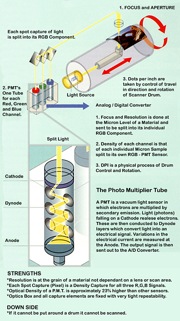
Click to see the full size image in a new window.
©Aztek, Inc. Used with permission, All rights reserved.
What is Kami and Kami SMF?
What is Kami and Kami SMF?
Kami is a brand of mounting fluids designed for high end drum scanners and flatbed scanners.
Kami Scanner Mounting Fluid (SMF)
Is a non toxic petroleum based product with high anti-static properties.
It cuts down on diffraction of light allowing accurate sampling of film grain, evens the scanner’s focal plane resulting in better focus,
less time spent on post scan touchup and provides anti-newton benefits all at once.
Kami SMF is extremely important for archival quality scanning and negative films.
Kami SMF will not damage film in any way. Unlike the oils used years ago, Kami SMF will not absorb into the emulsion.
It is safe to use on all films that are not Nitrate based and in a non brittle condition.
The Kami product line has been industry tested for over 20+ years with outstanding results.
Can we scan retouched film?
Can we scan retouched film?
The short answer is Yes!
The long answer...
Film that has been traditionally retouched can be drum scanned with a few caveats.
1. Tape retouching is normally ok but be aware that Kami is a solvent and the glue that holds the tape on can dissolve.
In most cases, the solvent will only act upon the edges of the tape and it should remain mostly intact.
Older tape is extremely brittle and can come off easily. We will do our best to avoid damage to the tape but this is not always possible.
2. Non permanent pen or pencil retouching is more susceptible to the solvents used in drum scanning.
Permanent retouching dyes and permanent pen is better equipped to resist the solvents.
We generally have no issues or bleeding with permanent retouching.
For lower resolution scans, we can avoid fluid mounting and opt for dry mounting or gel mounting.
Please Note: we are not responsible for any retouching that is damaged or removed during drum scanning
We will do our very best to avoid damage to the retouching but this is not always possible.
Please contact us to discuss the options for scanning retouched negatives.
Can we scan Cross Processed (Xprocessed) film?
Can we scan Cross Processed (Xprocessed) film?
Yes! They actually scan extremely well.
When ordering a scan from Cross Processed (Xprocess) film, please specify if you would like us to scan it as a negative or positive.
If you have a color guide print or have an idea of how you would like the colors, please send it along.
It will help get the scan as close to the final color as possible.
While Cross Processed film scan great, they do tend to exhibit larger grain structures (dye clouds).
We can vary the aperture on our scanners to smooth or exaggerate this effect.
Can we scan a print?
Can we scan a print?
Yes! but the print must be able to wrap around our drum without cracking or damaging the print.
Generally, all double weight fiber papers will wrap just fine and will all color papers.
We can even scan pencil/pen drawings, collages, prints and anything else that is thin enough to wrap around our drum.
The amount of spotting required is higher with prints and the sharpness is not as good as a negative.
This has nothing to do with the scanner but the fact that prints scatter light and appear duller.
Luster papers are the worst offenders, they have a pebble like texture to the surface that blurs the print.
Gloss or matte produce a much better scan.
Can we scan film processed in Pyro?
Can we scan film processed in Pyro?
Yes we can!
Film processed in Pyro scans wonderfully.
The highlights and shadows are fantastic and keep with a traditional print.
We have scanned a lot of Pyro film in almost all of the variants and they all come out great.
Especially ULF film. We shoot 12x20 on occasion and process it in PMK Pyro.
The results are spectacular.
What is the best film for drum scaning?
What is the best film for drum scaning?
Thats a good question!
In terms of grain size and overall sharpness:
For chrome, Fuji RDP3, Velvia 50 and the Kodak E100G line.
Fuji Velvia 100/F and Astia are extremely grainy in the shadows.
For Color Negative films, All current emulsions are wonderful.
Older films are much grainer then the current offerings.
We particularly like Kodak Portra 160 and 400, Fuji Pro 160s and 400h.
All B&W films scan extremely well. They exhibit the same grain structures and looks as if they were traditionally printed.
This is fantastic for those who process film in special processes.
What are those BLUE lines?
What are those BLUE lines?
So what are those BLUE lines in drum scans anyway?
Well long story short they are scratches through the first layer of the emulsion (Color Negative only).
When the scratches are really deep, ie. through all of the layers, you will see the various color dye layers (RGB).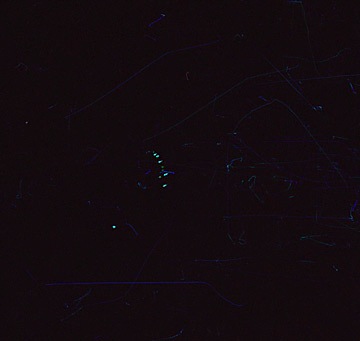
Image shows BLUE scratches in emulsion, 8x10 Kodak Portra Color Neg
We see this often in large format films (4x5+) but it can be helped. Check your dark slide for bowing or spurs. On medium format cameras, check your backs for rough edges or spurs.
Be careful with your film and dont shake the box before processing. When loading your holders in a changing bag, be careful of dust that might live in the bag.
In sandy areas or dusty areas, make sure you are careful not to get dust inside the changing bag.
Film can be delicate but it can take some abuse and still be usable. Have fun with it and remember to avoid the BLUE lines.
How do i place an order?
How do i place an order?
To place an order, please call or email us anytime with your order and shipping information.
Please mark your film carefully. Sticky notes tend to fall off in shipping so we recommend taping them on.
Remember to write the frame number on each note or on the sleeves.
If possible, Include a list of frame numbers and/or manifest for our reference.
We are not responsible if the film slides out of position causing us to scan the wrong frame.
To see a complete list of payment and shipping terms, Click Here.
What is the turnaround time for drum scans?
What is the turnaround time for drum scans?
From the time we receive your film, the standard turnaround time is 2-3 business days for quantities under 10 scans.
For larger quantities over 10 scans, please call to check our schedule.
Next day turnaround is an additional 100% per image.
Same day turnaround is an additional 200% per image.
Spotting will may add up to 1-5 business days depending on the amount of work needed.
Scanner Specifications
Howtek 7500 Specifications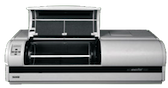 The Howtek 7500 Pro Drum Scanner
Our main scanner, the Howtek 7500 is the workhorse of our scanning department.
Spatial Resolution | User selectable from 50 to 5000 dpi. |
| Data Conversion | Linear and logarithmic. |
| Drum Speed | 600 to 1600 rpm. |
| Effective Scanning Area | Large drum: 23.38" x 18.38" (594 x 467 mm). Small drum: 11.38" x 18.38" (289 x 467 mm). |
| Image Types | Reflective and transparent copy (positive and negative). |
| Scanning Modes | Color or grayscale (8 or 12 valid bits per pixel, giving 256 or 4096 colors or levels of gray) |
| Field Stops (Aperture) | Fourteen. |
Aztek Premier Specifications
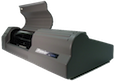 The AZTEK PREMIER Drum Scanner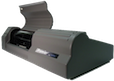
Our newest addition to our scanning department,
the Aztek Premier can produce files over 30+ gb from film up to 8x10.
Beneath its straightforward appearance, the NEW Advanced AZTEK® PREMIER™ DRUM SCANNER
possesses capabilities unavailable in any other Scanner.
With its patented Photo Multiplier OptiVu™ Technology,
the Premier automatically manages and focuses variable scan capture spot sizes
down to 3 microns (3 thousandth of a millimeter) to match the grain of the film.
This function is performed completely independently of the resolution (or dpi) of the scanner's resolution.
The AZTEK OptiVu technology uniquely results in literally flawless archival large format scanning,
at any scale factor (even at 21,333% or 64,000 dpi) without any grain noise or other image artifacts.
With both the sensitivity of Photo Multiplier Sensors and OptiVu advantages.
The AZTEK Premier has proven itself in both photo lab production and industry standardized
benchmarks to have greater density sensitivity, optical accuracy, image quality, speed
and scaling capability than any other professional film scanner tested to date.
The AZTEK Premier is the result of 15 years of Photo Imaging Industry research development
and is the only OptiVu, density based, P.M.T. (Photo Multiplier), 48-Bit Drum Scanner.
Unlike other scanners without OptiVu Technology, most are limited to just a few physical spot sizes
or true physical optical resolutions and perform only “Log Space" or "ICC Capture”.
The AZTEK Premier is equipped with 18 physical optical spot sizes and truly can see or sample in the
finest detail spot size of 3 microns (3 thousandth of a millimeter) and each scan is density calibrated!
All of which are under automatic software control, tailored to the media or film being scanned.
These capabilities allow for optimum grain management and unsurpassed optical enlargements
without scanner noise un sharp masks or similar problems.
Scanning Area | 12” x 12” (304mm x 304mm) |
| Scanning Principle | Single pass with 3 independent photo multipliers and aperture light path control |
| Spot Size | 18 sizes, starting at 3 microns or 3 thousandth of mm |
| Capture Fidelity | All scans are 16-bit separate RGB output |
| Optical Step Resolutions | Twenty steps: 16,000 x 8,000; 80002, 40002, 32002, 2,6662, 20002, 16662, 13332, 11422, 10002, 8882, 7272, 6152, 5002, 4002, 3202, 2502, 2002, 1002, 802 |
| Interpolated Resolution | 64,000 dpi bi-cubic interpolation in increments of 1 dpi |
| Scaling (at 300 dpi) | 2,666 % optical or up to 21,333 % bi-cubic interpolated |
| Maximum File Size | 96 GB 48-bit |
| Original Media Types | Transparencies (positive and negative), reflective, unframed slides, printed material and half-tone screened films |
| Scan Modes | RGB and CMYK density, RGB log, gray-tone, ICC/ICM |
| File Formats | TIFF 8, 16, 24, and 48-bit RGB; CMYK and Gray; PSD; Loss-Less; WMF; BMP |
| Industry* Dmax | 5.9* |
| Actual Optical Density | ANSI / ISO Status A Density between .02 Dmin and 3.88 Dmax |
| Workflow | Density and ICM / ICC color management tagging and conversion |
File Retention Policies
PrePress Express will maintain your scans live on our server for a period of 1 Year after the order ships out.
After 1 year, the files are removed unless other arrangements have been made.
Please Contact Us for more information.
If an additional CD or DVD is needed within 1 Year, there is no charge to retrieve the files from our backups.
The charge to burn an additional CD/DVD is $15 per disc + shipping.
No charge for sending the file to our secure web download server.
From Web Download Server:
PrePress Express will maintain your scans live on our secure web server for a period of 180 Days after the order ships out.
After 180 Days, the files are removed unless other arrangements have been made.
Please Contact Us for more information.
Long Term File Storage
Thank you for visiting our Drum Scanning FAQ. If you have any questions, please contact us anytime.
All information contained on this page is ©2006-2017 Photographer At Large / PrePress Express and may not be reproduced without our written consent.